
Click here for more information. In electrical engineering, a hazardous location (HAZLOC) is defined as a place where concentrations of flammable gases, vapors, or dusts occur. Electrical equipment installed in such locations must be specially designed and tested to ensure they do not initiate an explosion due to arcing contacts or high surface temperature of the equipment.
Safety Information for the FARO Laser Scanner
Laser Specifications:
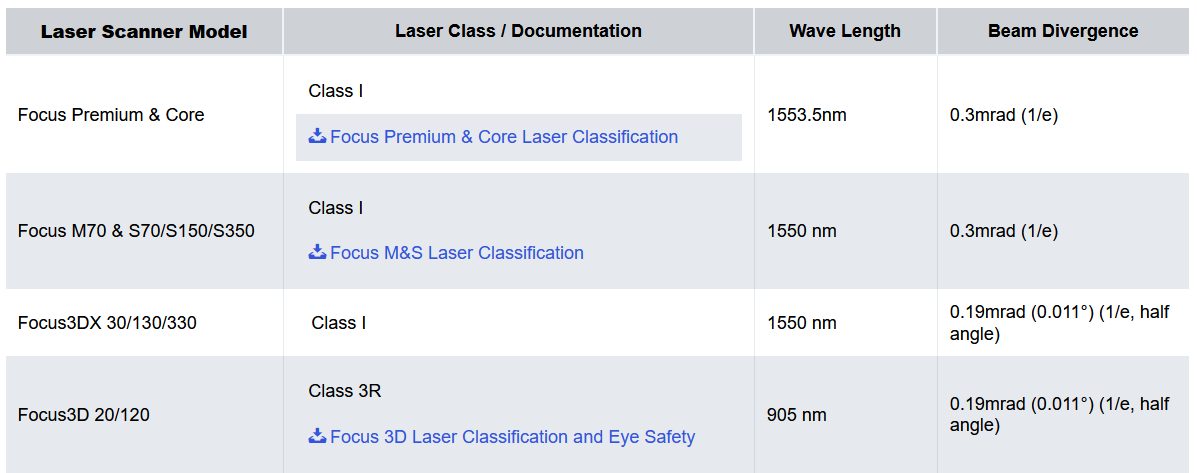
Class I: Safe. Any laser or laser system containing a laser that cannot emit laser radiation at levels that are known to cause eye or skin injury during normal operation.
Class 3R: Safe when handled carefully. Only a small hazard potential for accidental exposure. Direct intrabeam viewing may be hazardous for the eyes when defined exposure limits are exceeded. For more information, please see the Focus 3D Laser Classification and Eye Safety document.
For more information on laser classifications and regulations, please visit the following sites:
- ANSI (American National Standards Institute)
- FDA (Food and Drug Administration) and the Center for Devices and Radiological Health (CDRH)
-
- (IEC document 60825-1 is the primary standard that outlines the safety of laser products.)The International Electrotechnical Commission (IEC)
General Safety Information
- Read the User's Manual carefully and refer to it. Pay close attention to all warnings and follow the instructions step by step
- In the interests of safety, the laser scanner and its accessories should only be used by suitably-trained and knowledgeable operators, after they have read and understood the User Manual, and carefully considered all potential hazards involved. We recommend that operators participate in trainings offered by FARO
- Improper use can impair the protection provided by the product, and lead to product damage or serious personal injury. Improper use means using the product in other ways than the ones described in the User Manual, or under operating conditions that differ from those described
- Do not expose the laser scanner and its accessories to extreme temperatures. The ambient temperature must not be lower or higher than the ones presented in the specifications. Do not use the laser scanner near heat sources such as radiators, heat registers, or other products (including amplifiers) that produce heat
- Properly dispose of the product and its batteries in accordance to your country’s regulations
- Do not use the laser scanner and its accessories in an explosive atmosphere, like in the presence of flammable gases or fumes. Operation of any electrical instrument in such an environment constitutes a definite safety hazard
- Before operating the laser scanner and its accessories in hazardous areas, contact the local safety authorities and safety experts
- When the product is transferred from a cold to a significantly warmer environment, water may condense on some elements inside the scanner. To avoid this, we recommend placing the scanner in an airtight plastic bag before bringing it from a cold to a significantly warmer environment. This allows the condensation to form on the bag and not inside the scanner. If you do not have the possibility to pack the scanner airtight, wait until observable condensation water evaporates from the scanner before switching it on
- If the scanner becomes wet, let it dry completely before placing it in the transport case. Ensure that the foam in the case never gets wet while unpacking or packing the scanner
- Do not operate the scanner while the external power supply is plugged in. The power cable might damage the turning scanner
- Do not use parts which have not been supplied or recommended by FARO
- Servicing and repair must only be done by qualified service personnel authorized by FARO. Unplug the product from the power outlet, remove the battery and refer servicing to qualified service personnel under the following conditions:
- The power-supply cord or plug is damaged
- The product has been exposed to rain, water, or other liquids
- The product has been dropped or damaged in any way
- Objects have fallen onto the product
- The product does not operate normally by following the operating instructions
- The product exhibits a distinct change in performance
- The required service and calibration date is reached
- The Focus Premium is classified as a CLASS 1 LASER PRODUCT in accordance with IEC 60825-1:2014 (ed. 3). Complies with 21 CFR 1040.10 and 1040.11 except for conformance with IEC 60825-1 Ed. 3., as described in Laser Notice No. 56, dated May 8, 2019.
- Due to the permanent rotation of the deflecting mirror, the human eye is exposed to the IR laser for only very short periods of time per revolution, and thus the average deposited energy is well below the limits for a laser class 1 device.
- The laser scanner is safe under reasonably foreseeable operating conditions. The maximum permissible exposure (MPE) cannot be exceeded. It is harmless to the eyes if it is used and maintained in accordance with the instructions of the User Manual.
FARO Focus M and Focus S Series:
- The FARO® FocusM and FocusS utilize a Class 1 Laser. Click here to download the expert classification and certification documentation according to the IEC 60825-1 Ed. 2.0 (2007) and Ed. 3.0 (2014) standards.
- Due to the permanent rotation of the deflecting mirror, the human eye is exposed to the IR laser for only very short periods of time per revolution, and thus the average deposited energy is well below the limits for a laser class 1 device.
- The laser scanner is safe under reasonably foreseeable conditions of operation. The maximum permissible exposure (MPE) cannot be exceeded. It is harmless to the eyes if it is used and maintained in accordance with the instructions of the User Manual.
Electrical Safety:
- Do not open the housing: you can get hurt seriously, and damage the product, which will affect its warranty. Dangerous high voltages are present inside the enclosure. Only qualified service personnel should open the housing
- Never push objects of any kind into this product through openings as they may touch dangerous voltage points or cause short circuits. This could result in a fire, electric shock, and damage to the product
- This device is not intended for use in residential environments, and it cannot ensure a suitable degree of protection of radio reception in such environments
- Do not immerse the scanner and its accessories into water. Liquid in the product enclosure can lead to damage, fire, or electric shocks
- This product should be operated only from the power source or a battery supplied or recommended by FARO. Ensure that the specifications of the AC converter are met by your line voltage. If you do not know the power line voltage in your area, consult your local power company
- To avoid electrical shock, use the power supply unit in dry indoor environments only
- Do not use the scanner in the vicinity of strong magnetic or electrical fields
Mechanical Safety:
- The mirror unit rotates with high speed while scanning and for a short period after the scan. While the mirror is rotating keep your distance from the product and do not touch the rotating mirror unit with your hands, fingers, hair, clothing or any objects at the risk of personal injury and damage to the product
- The scanner may only be used when set on a flat and stable surface. Injuries may result if the scanner overturns
- Never try to grab the scanner if the tripod tips - grab the tripod instead
- Only use equipment recommended by FARO, and follow FARO setup instructions
- Do not open the housing: you can get hurt seriously, and damage the product, which will affect its warranty
- If using a cart or tripod dolly, move the setup with special care. Never move the cart by pulling the power cables. Pushing or pulling the cart with too much force, sudden stops, or on an uneven surface can cause disturbances of the scanner’s normal functioning
- The scanner will rotate clockwise up to 360 degrees when performing a scan. Ensure that the scanner head can rotate freely and will not hit any objects during the scan